Check Phone
You can check whether your phone supports HiCar, or purchase a new phone that supports HiCar.
1. Which Phone Brands Support HiCar
In What Does HiCar Include, we explained that HiCar relies on the underlying operating system capabilities of the phone. Therefore, not all phone brands can use HiCar. Since HiCar is a connectivity solution provided by Huawei, the phones that currently support HiCar are mainly Huawei-related brands, which fall into the following categories:
- Huawei phones: Basically, any model with sufficient hardware already supports HiCar.
- Old Honor phones: Honor phones sold before the Honor sale — the vast majority also support HiCar.
- New Honor phones: Honor phones newly released after the Honor sale — only some newer models support HiCar, and currently only support older versions of HiCar.
- Huawei Smart Selection phones: Phones from brands such as Hi Nova, TD Tech, etc., also support HiCar.
Phones from other brands cannot use HiCar at present. Even if you try to extract the HiCar installation package and install it, it won't work. The reason, as we mentioned before, is that HiCar's operation depends on certain capabilities of the phone's underlying operating system.
2. Which Phone Models Support HiCar
Now that you know which brands support HiCar, which specific models within those brands support HiCar? Let's find out.
Because HiCar supports both wired and wireless connections, but due to hardware and software limitations of some phones, not all HiCar-supported phones support both wired and wireless connections simultaneously. Therefore, the official classification distinguishes HiCar-supported phones by connection method.
Supports Both Wired and Wireless Connections
| Series | Models |
|---|---|
| Mate | Mate XT Ultimate Design, Mate X6, Mate X5, Mate X5 Collector's Edition, Mate X3, Mate X3 Collector's Edition, Mate X2, Mate Xs2, Mate X, Mate Xs, Mate 70 Pro+, Mate 70 Pro, Mate 70, Mate 70 RS, Mate 60 Pro+, Mate 60 Pro, Mate 60, Mate 60 RS, Mate 50E, Mate 50, Mate 50 Pro, Mate 50 Porsche Design, Mate 40E Pro, Mate 40E, Mate 40E 4G, Mate 40 Pro 4G, Mate 40, Mate 40 Pro, Mate 40 Pro+, Mate 40 RS Porsche Design, Mate 30 5G, Mate 30, Mate 30E Pro 5G, Mate 30 Pro 5G, Mate 30 Pro, Mate 30 RS Porsche Design, Mate 20, Mate 20 RS Porsche Design, Mate 20 Pro, Mate 20X, Mate 20X 5G, Mate RS, Mate 10 Porsche Design, Mate 10, Mate 10 Pro |
| P | Pura 80 Pro, Pura 80 Pro+, Pura 80 Ultra, Pura X, Pura70, Pura70 Pro, Pura70 Pro+, Pura70 Ultra, P60 Art, P60 Pro, P60, P50 Pocket, P50 Pro, P50, P50E, P40 Pro+, P40 Pro, P40, P30 Pro, P30, P20 Pro, P20 |
| Pocket 2, Pocket S | |
| nova | nova 14, nova 14 Pro, nova 14 Ultra, nova 13, nova 13 Pro, nova Flip, nova 12, nova 12 Pro, nova 12 Ultra, nova 12 Vitality Edition, nova 12 Ultra Starlight Edition, nova 11, nova 11 Pro, nova 11 Ultra, nova 11 SE, nova 10 SE, nova 10, nova 10 Pro, nova 10 Youth Edition, nova 9, nova 9 Pro, nova 9 SE, nova 8, nova 8 Pro 4G, nova 8 Pro, nova 8 SE, nova 7 SE 5G, nova 7 SE 5G Lohas Edition, nova 7 SE, nova 7 Pro 5G, nova 7 Pro, nova 7 5G, nova 7, nova 6 SE, nova 6 5G, nova 6, nova 5i Pro, nova 5, nova 5 Pro |
| Other | Huawei Enjoy 60 Pro, Huawei Enjoy 60 X, Huawei Enjoy 50 Pro, Huawei Enjoy Z 5G, Huawei Enjoy 20 Plus, Huawei Enjoy 20 Pro, Maimang 9 5G, Honor Play4T Pro, Honor Play4 Pro, Honor Play4, Honor V30 Pro, Honor V30, Honor V20, Honor X10, Honor Magic2, Honor 30S, Honor 30 Pro+, Honor 30 Pro, Honor 30, Honor 30 Youth Edition, Honor 9X Pro, Honor 9X, Honor 20 Pro, Honor 20S, Honor 20 |
Supports Wireless Connection Only
| Series | Models |
|---|---|
| Other | Honor Magic V2, Honor Magic V2 Premium Edition, Honor Magic 5, Honor Magic 5 Pro, Honor Magic 5 Ultimate Edition, Honor Magic Vs, Honor Magic 4 Pro, Honor Magic 4 Pro Premium Edition, Honor Magic 4, Honor Magic V, Honor Magic 3, Honor Magic 3 Pro, TD Tech P50, TD Tech M40, TD Tech N8 Pro, Hi Nova 9, Hi Nova 9 Pro, Hi Nova 9 SE, Hi Nova 10, Hi Nova 10 Pro |
The Honor models listed here currently only support HiCar App version 12.2.0.448 and below, and cannot support higher versions in the future. For other models, due to system version reasons, some features may not be available after upgrading to the latest HiCar App.
Supports Wired Connection Only
| Series | Models |
|---|---|
| nova | nova 7 SE 5G Lohas Edition, nova 4 |
| Other | Honor X10 MAX, Honor V10, Honor 10, NZONE S7 Pro |
- Currently, only the models listed above sold in mainland China come pre-installed with HUAWEI HiCar. Models sold in Hong Kong, Macao, Taiwan, and other countries/regions do not yet support HUAWEI HiCar.
- Huawei phones launched in mainland China in the future will support HUAWEI HiCar provided they meet the HUAWEI HiCar resource specifications.
- Support for existing phone upgrades and new phones may be adjusted during the development process; please refer to actual support.
- HUAWEI HiCar supports phone system versions EMUI 10.0 and above, and HarmonyOS 2.0 and above.
The above information is from Huawei Developer Alliance - HiCar Supported Phones.
3. Check Whether Your Phone Supports HiCar
Even if your phone is on the list above, it does not necessarily mean it can use HiCar. HiCar also depends on the phone's system version and whether the phone is a Hong Kong, Macao, Taiwan, or overseas model. Details are as follows:
Currently, only the models listed above sold in mainland China come pre-installed with HiCar. Models sold in Hong Kong, Macao, Taiwan, and other countries/regions do not yet support HiCar.
HiCar supports phone system versions EMUI 10.0 and above, and HarmonyOS 2.0 and above.
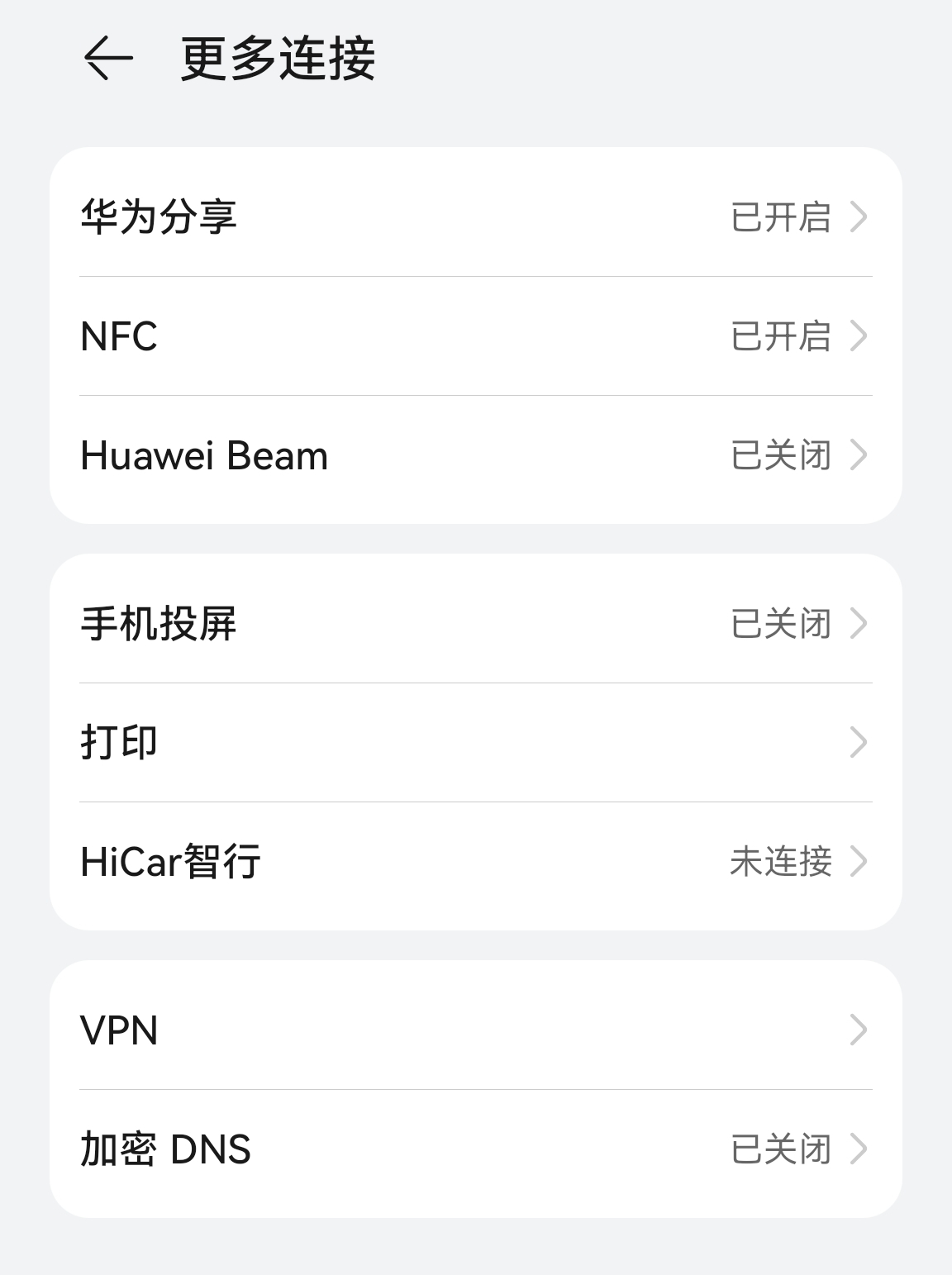
If you happen to have a phone from one of the brands or support lists above, the best way to check whether it supports HiCar is as follows:
- HarmonyOS 4.X and earlier: Open your phone's "Settings > More Connections". If you can see the "HiCar" or "HUAWEI HiCar" menu, your phone supports HiCar.
- HarmonyOS NEXT: Open your phone's "Settings > Multi-Device Collaboration". If you can see the "HUAWEI HiCar" menu, your phone supports HiCar.